Instructions
Setup
Blinks begin the game as tan-colored “Hull” pieces with 5 Hit Points (HP) and a white “Repair” face. Cluster all the Blinks together, then remove at least 2 Blinks to make them into “Hazard” pieces. To do this, make sure they are alone, then double-click them.
Hazard pieces show a bright red “Y” shape. In games with more than 8 Blinks, you can also turn some Blinks into “Redirector” pieces by double-clicking a Hazard. We recommend that new players start with two Hazard pieces, with the rest of the Blinks being Hull pieces.
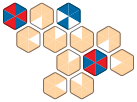
Example ship with 2 Hazards and 1 Redirector
Gameplay
Each turn consists of three phases. Each phase occurs only once, and cannot be skipped or played out of order.
Rearrange
Rearrange the ship by splitting it in two chunks and reconnecting them. You may move any number of contiguous Blinks so long as the ship is never split into more than two chunks at any time.
There are rules for how a ship can be legally rearranged. If two pieces are connected, they must also share a third neighbor. If they do not, this is considered a “weak link,” and is not a legal move.
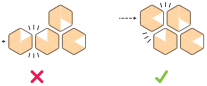
An illegal link and a legal link.
In addition, Hazard and Redirector pieces must always be touching at least one Hull piece.
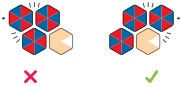
An illegal Hazard position and a legal Hazard position.
Blinks that are placed in an illegal position will change appearance to help you maintain the rules. The Hull color will change from tan to a deep orange, and the water will change from a slow wave to a spiraling whirlpool.
Repair & Redirect
You must press one Hull piece of your choice. That piece will lose one HP and transfer it to whatever piece is connected to its Repair Face. If that piece is a Hull Piece with less than 5 HP, it will gain one HP back. Otherwise, the HP is simply lost.
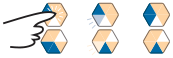
A Hull piece transferring 1 HP to its neighbor
If you are playing with Redirectors, you may also choose to press one Redirector. This will rotate its orientation clockwise by one face.
Lasers
In whatever order you desire, press each Hazard piece once. Pressing a Hazard will fire lasers outwards in a line from each of its 3 red faces. Each laser will deal 1 HP of damage to each Hull piece in its line of fire. This will also cause the red faces on the Hazard to flip.
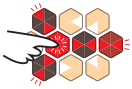
Lasers firing from a Hazard piece
Damaged Hull pieces lose a tan face, and reveal the blue waves below.

A ship with damaged hull pieces.
If a laser hits a Redirector, the path will bend to match it. This also causes the Redirector to rotate its orientation by one face.
If there are no Hull pieces that have hit zero HP, you may continue to the next turn.
Win Condition
When any Hull hits 0 HP, it will become flooded with water and sink the ship, ending the game.

A ship with a flooded Hull piece
Count up how many rounds you lasted, and see if you or a friend can do better with whatever initial layout you created. To reset, triple click any piece to restore the HP of all hull pieces.
Multiplayer Variant
Pirates & Lasers can be played as a two player game with a few adjustments. First, the game requires at least 12 Blinks, with at least 2 Hazards and 1 Redirector. The turn structure is the same, and players trade off taking turns. The player who sinks the ship is the loser.
Credits
Game Designers
Ian Cummins
Michael Cooper
Theo Johnson
Pricilla McGann
Artist
Pricilla McGann
Pirates & Lasers is part of the Solo Challenger Pack.