Instructions
Setup
Blinks begin the game as unscored Flickers, which appear as a spinning white light. Set three Blinks aside, then evenly distribute the remaining Flickers to all players. Assign each player one of three colors: magenta, cyan, or yellow.

One Flicker
Take the Blinks you set aside and long press them. This will turn them into Floppers, which appear as fully colored Blinks, periodically cycling magenta, yellow, and cyan. Long pressing a Flopper when alone will return it to a flicker.

Turning a Flicker into a Flopper
Take all three Floppers and combine them into a single cluster. Place the cluster about 3 feet away from the players - the further away you place the Flopper, the more challenging the game will be.

Creating a cluster of Floppers
Gameplay
Players take turns sliding their Flickers towards the Flopper. Attaching to the Flopper will score the Flicker for the team color being displayed. A scored Flicker that has been connected displays a single dot of its scoring color and an entire half Blink of the current Flopper color. That Blink is now an extension of the Flopper, so Flickers that attach to it will score for the color of the Flopper.
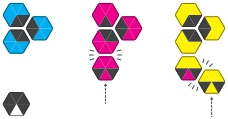
Flicker connection examples
Some Flickers may not attach at all when thrown: these are left where they are. They are still active, and may be knocked into the cluster by other players’ Flickers.
After every Flicker has been thrown, pull the unattached flickers aside, then separate the scored Flickers. This will make them display their scored color. Count the amount of your color and add that to your score tally. Double-click scored flickers to reset them for the next round.

Win Condition
The first player to reach 11 points is the winner. If two players end a round with 11 or more points, the player with the most points in total is the winner.
Credits
Game Designers
Jonathan Bobrow
Dan King
Nick Bentley
Artist
Jonathan Bobrow
Flic-Flop is part of the Ultimate Action Pack.