Instructions
The game will begin in Setup Mode, marked by random, sparkling colors. Click the middle Blink to select it as your Hex tile. It will glow blue with a flashing yellow face. All Blinks touching your Hex tile automatically become Rune tiles and will display rune-like, white patterns.

Single-click middle blink to create a Diamond
Difficulty Selection
To set the puzzle difficulty, click the Hex tile to cycle through all six difficulty levels. The number of pulsing yellow faces on the Hex tile indicates the difficulty- 1 being easy and 6 being difficult. You can also discard

Single-click the Hex tile to cycle difficulty
Game Play
Now that you have decided the difficulty, double click the Hex tile to begin. The Hex tile now contains your puzzle and the Rune tiles have revealed their patterns. The game begins!

Triple-click a Blink to change its color
Each Rune tile will display white, indicating it is in a neutral state and will not influence the puzzle. Click Rune tiles to cycle through red, green, and blue.

Single-click a Rune tile to change its color
Pattern Matching
Compare the patterns of the Rune and Hex tiles. The color pattern displayed on the Rune tile will influence Hex tile when connected. As you rotate, connect, and separate Rune tiles from the Hex tile, there are three possible ways that the Hex tile will change: 1. Dispel: If the face color of a Rune tile matches that of a Hex tile, it will dispel the color completely from the Hex tile.
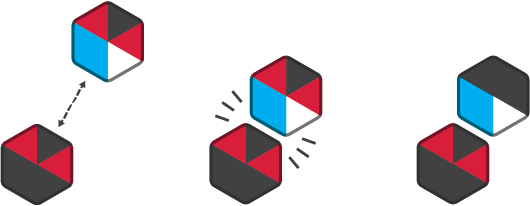
Match patterns to dispel the color from the Hex tile
2. Add: If a face color exists on a Rune tile, but is empty on a Hex tile, this color will be added to the Hex tile.
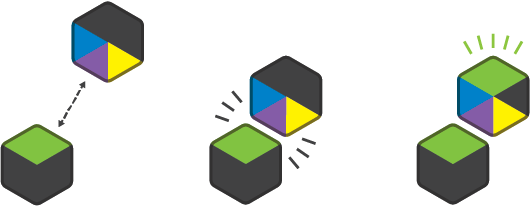
Mismatched patterns will appear on the Hex tile
3. Mix If a face color exists both on a Rune tile and Hex tile, the colors will mix into a new color.
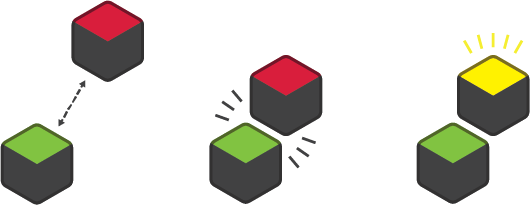
Mismatched colors will create a new color on the Hex tile
In order to dispel this new color, you will have to match all the face colors that make up this new color. Combinations of Red, Blue, and Green Rune Tiles can mix together to create new colors on the Hex tile:
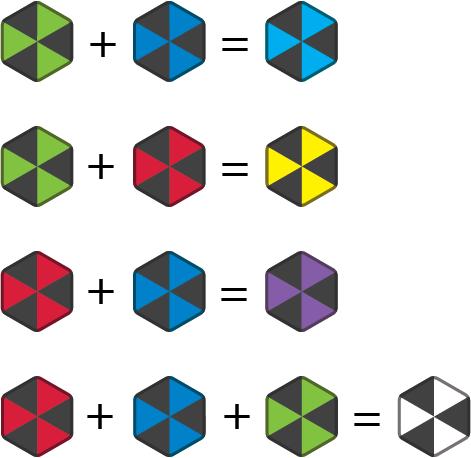
Different combinations of red, green, and blue will create new colors
Rotate, detach, and reattach your Runes. Watch closely how colors mix, disappear, or reappear on the Hex tile depending on their orientation.
Reset
At any time you may reset the game by long pressing any blink in the cluster.

Long-click any blink to reset the game
Win Conditions
You win once you fully dispel the hex, and the Hex tile is cleared of all colors. You will be treated with a magic rainbow burst. Click any tile to reset and start anew.

There is at least one guaranteed solution for every puzzle. There may even be a solution that does not use every rune!
Credits
Game Designer
Scott Cartier
Artist
Elizabeth Yuan
Dispel is part of the Puzzle Wizard Pack.